Case Study:
Data Visualization — Visual Analyzer
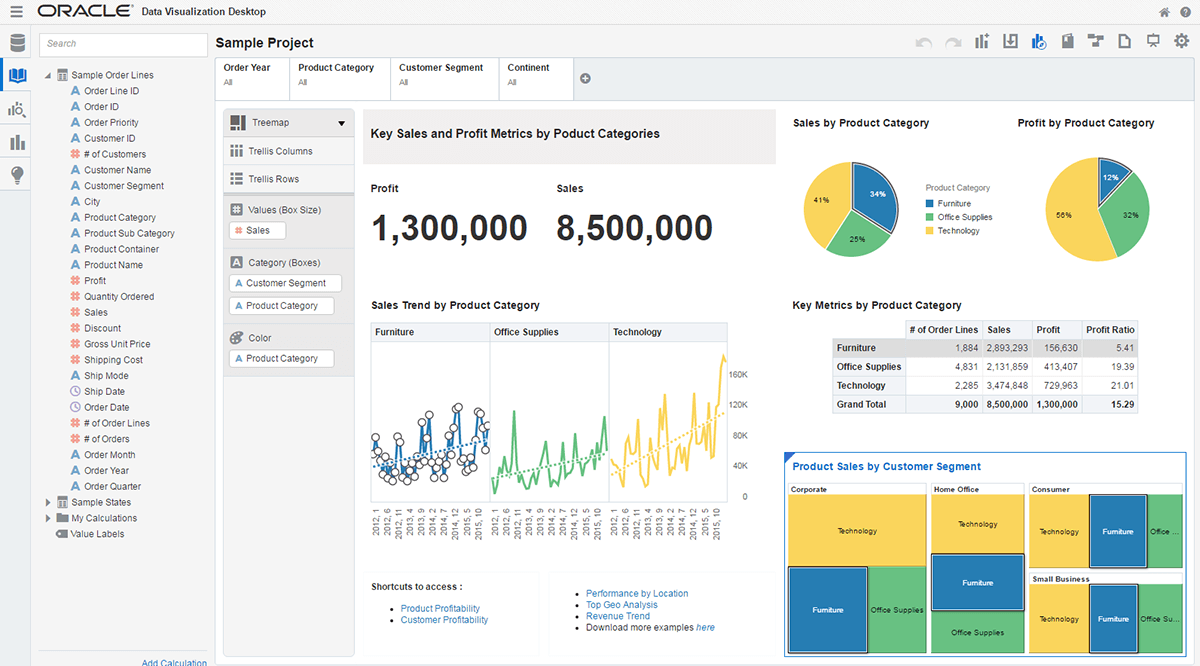
Context
Oracle’s analytics platform was trusted because it was consistent and controlled. Data definitions were standardized so that revenue, pipeline, and quota meant the same thing everywhere. Access rules ensured that users only saw the data appropriate to their role. Reports were reliable and repeatable.
What the system did not support well was answering new questions in the moment.
The platform had been built over many years. Its data structures were defined upstream, and reporting was layered on top of that structure. By the time users opened a dashboard, the shape of the data had already been decided.
If a user’s question fit that structure, the system worked well. If it did not, the user had to adapt their thinking to the system rather than reshape the system to fit the question.
Adjusting relationships, redefining metrics, or regrouping data often required upstream changes. The workflow protected consistency, but it slowed learning.
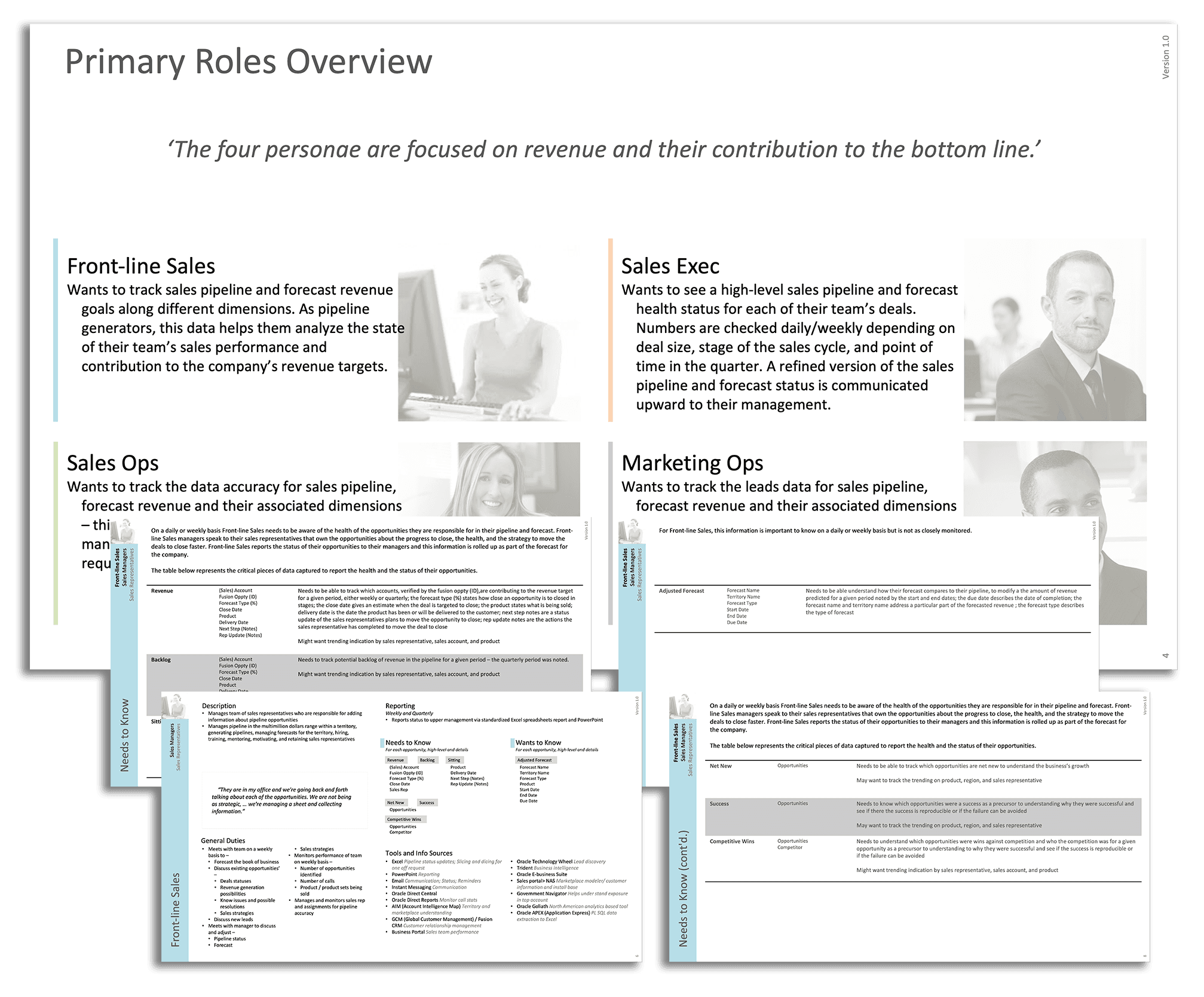
Defining key personas to anchor interaction decisions in real-world reporting behavior
As a result, exploratory work often moved outside the platform. Analysts exported data into spreadsheets where they could reorganize columns, test alternative totals, and explore different ways of framing the same information before returning to the governed system to formalize results.
Governance stayed inside Oracle. Exploration happened elsewhere.
Visual Analyzer was initiated to bring those two modes back together.
The goal was not to add another reporting interface. It was to redesign how trusted data could be reshaped within the system so that users could ask new questions without stepping outside the controls that made the data reliable.
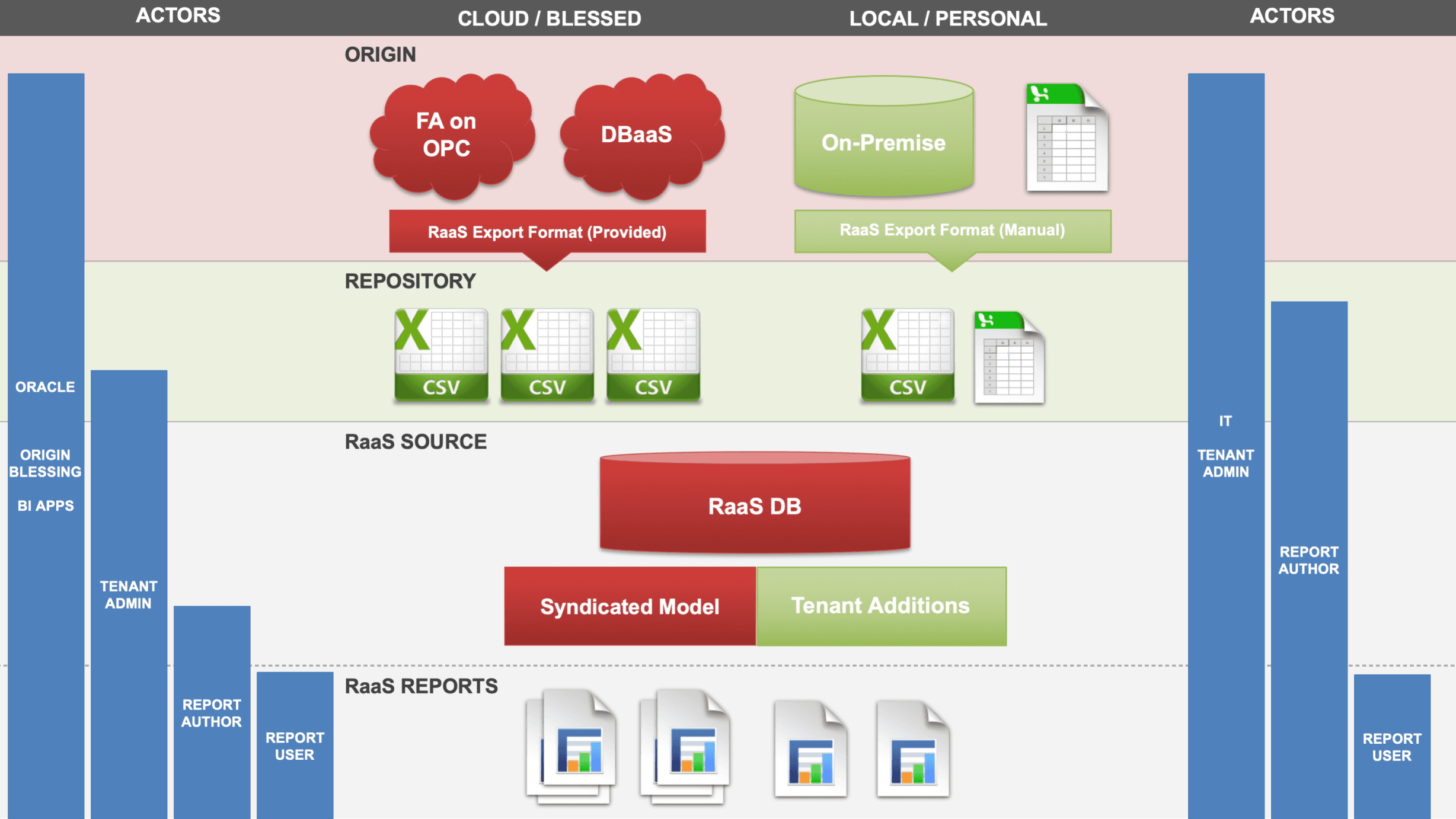
Existing Framework and Users
COMPANY
ORACLE
2016
ROLE
Design Lead — Directed UX for Visual Analyzer
EXPERTISE
User experience design, interaction design, data modeling, prototyping, analytics platforms
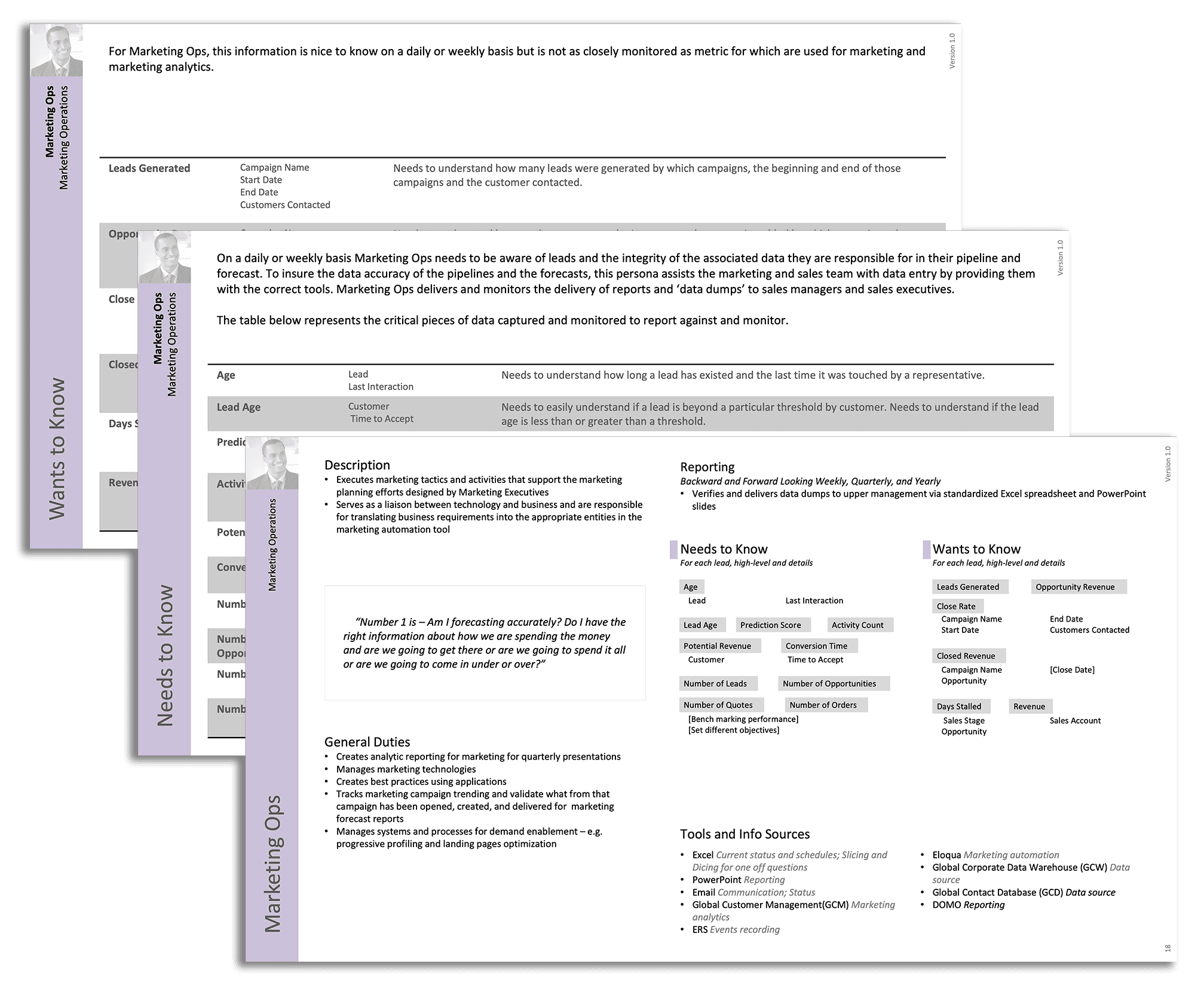
Persona research documenting what each role needed to know, monitor, and report
The Shift We Needed to Make
Oracle’s analytics architecture separated data modeling from analysis. Relationships, calculations, and access controls were defined before users ever opened a report, and those definitions were managed by a small set of administrators and data stewards. That approach ensured that everyone saw consistent numbers and that sensitive data was protected.
However, it also meant that structural decisions were locked in before users began their work. If someone needed to redefine a calculation, combine datasets in a new way, or explore a relationship that hadn’t been anticipated, the interface alone could not accommodate that change. Adjustments often required updates to the underlying model before they could be reflected in reports.
That sequence protected consistency and access control, but it slowed down the very thing the users were trying to do: answer questions quickly and iterate on their thinking.
The team faced a decision.
One option was to improve the existing reporting workflow — streamline configuration steps, expand template options, and reduce rebuild time. This would make the current model more efficient, but it would not change the fundamental separation between modeling and analysis.
The other option required rethinking that boundary.
Instead of treating modeling as something that happened only upstream, we could allow users to shape structure directly inside the authoring experience — while still honoring the rules that protected consistency and access control. This was the more disruptive path. If we introduced too much freedom, we risked weakening the trust that made the platform valuable. If we preserved too much control, we would reproduce the same friction we were trying to solve.
The shift, therefore, was not cosmetic. It was architectural.
We redesigned the interaction model so that structure could be composed directly within the interface, with constraints applied at the moment of action rather than enforced later through error messages or administrative review.
What We Already Knew About the Users
This was not a discovery exercise. We already had a detailed understanding of who used Oracle’s analytics tools, what they did with them, and where they ran into friction.
Sales managers used dashboards to track pipeline velocity and territory performance. Operations planners reconciled forecasts with actuals. Executives monitored aggregated trends and outcomes. In each role, users depended on trusted definitions — consistent metrics and shared numbers — to make decisions.
But when the dashboards could not answer a question immediately, users reached for other tools.
Across multiple research sessions, a consistent pattern emerged: users exported data into spreadsheets when they needed to test totals, view alternative groupings, or experiment with relationships the system did not readily support. Inside the governed environment, the numbers were trusted; outside, in the spreadsheet, they could explore freely.
That pattern revealed a gap — not in trust, but in flexibility.
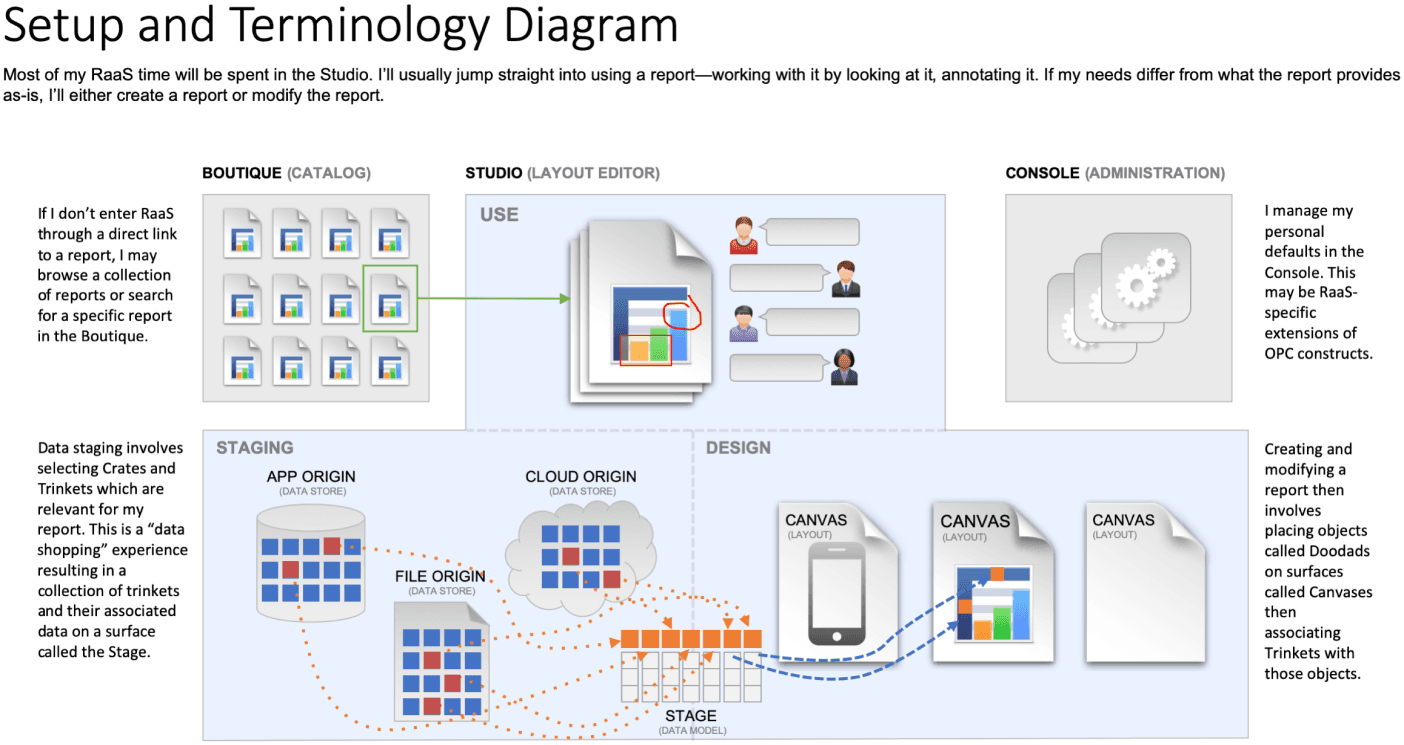
New Terminology for Report Creation Experience
Users were not asking for unrestricted access to raw data. What they needed was the ability to adjust how data was put together so they could answer questions that did not fit the assumptions built into the existing reporting interfaces.
The core limitation was not that the platform was inaccurate, but that it was slow to adapt to new questions.
Visual Analyzer was designed to address that limitation — to give users the ability to iterate on their thinking inside the governed system rather than outside of it.
Why Existing BI Interfaces Broke the Experience
Oracle’s traditional business intelligence tools were strong at delivering trusted reports and consistent numbers. They centralized data definitions, relied on IT teams to shape models, and produced dashboards that were stable and repeatable. This made them useful for monitoring performance and aligning teams on shared metrics.
But that same structure limited agility. Traditional BI tools often required a request to IT or a change upstream in the data model before a user could test a new way of grouping data, adjust a calculation, or explore a relationship that hadn’t been anticipated. In practice, that meant users had to wait — sometimes days or weeks — for a change to appear, or they turned to spreadsheets to explore ideas on their own.
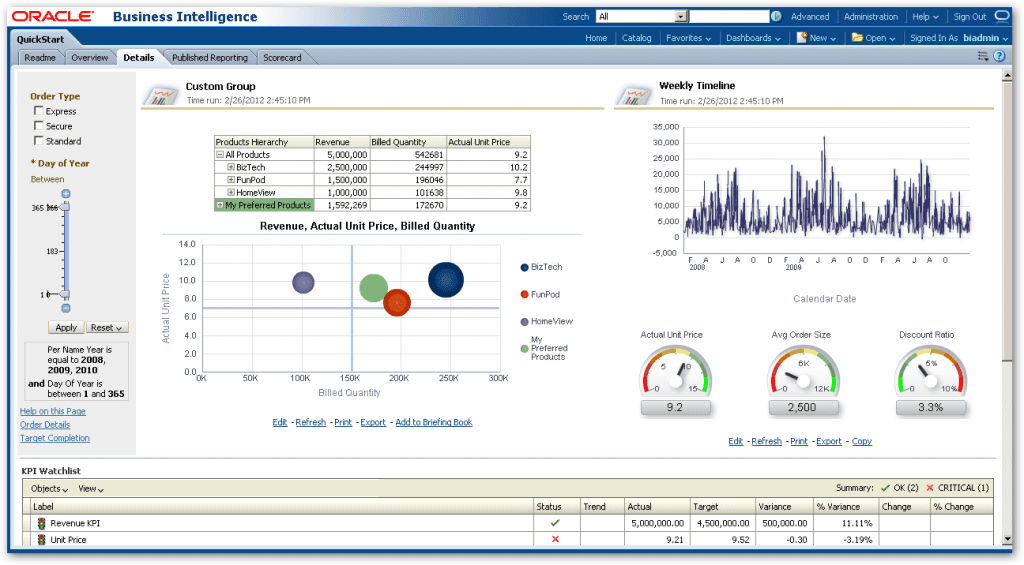
Previous Oracle Business Intelligence Experience 11g configuration-driven reporting experience prior to interactive structural authoring
In spreadsheets or external tools, they could iterate fast: rearranging columns, redefining totals, and answering follow-up questions without delay. Inside the governed system, they had accuracy but limited flexibility; outside, they had freedom but no built-in consistency.
The core tension was not that traditional BI couldn't display data. The tension was that it separated model definition from on-screen interaction, which slowed down analysis when questions didn't fit the assumptions built into its structures.
We considered incremental improvements to the existing reporting experience — speeding up configuration steps, reducing rebuild cycles, or adding more templates — but these would not address the fundamental lag between question and answer.
The decision was to redesign the boundary altogether.
Visual Analyzer reimagined the way structure worked inside the authoring experience, making exploration more immediate and user-driven while preserving consistent definitions and access controls that kept enterprise reporting trustworthy.
Design Hypothesis
The redesign began with a clear constraint: the rules that protected data trust could not be weakened.
Shared definitions, approved metrics, and role-based access controls were foundational to how Oracle Business Intelligence was used across the enterprise. If the new interaction model compromised those controls, it would undermine the very trust the system was built on.
The hypothesis was not that governance should be removed. It was that structure did not need to be locked in before analysis began.
Instead of finalizing relationships and calculations entirely upstream, we asked whether users could shape structure directly within the authoring experience — as long as the system enforced the same rules in real time.
This required redefining where validation occurred.
Rather than allowing users to assemble anything and surfacing errors after execution, the interface would prevent invalid combinations from forming in the first place. Rather than isolating modeling in administrative tools, the intelligence of the model would be embedded directly into the interaction.
If users could work directly with governed objects — and if the system continuously enforced what was permissible — exploration could remain inside the trusted environment instead of moving outside it.
This tension between flexibility and control defined the design effort.
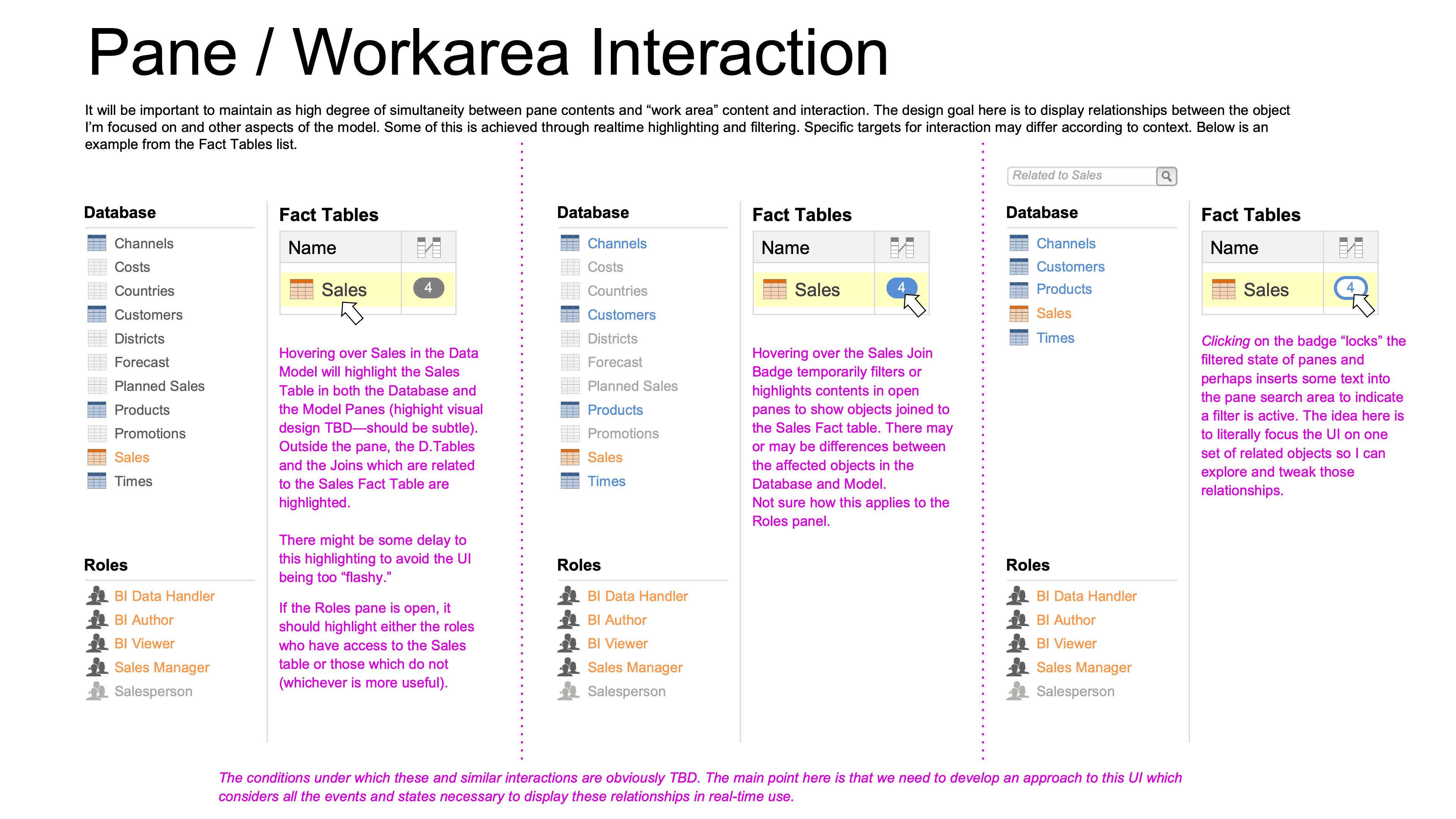
Prototyping real-time model awareness within the authoring interface
Designing a Greenfield Interaction Model
Rather than incrementally expanding the existing report builder, the team rethought how people actually worked with data.
Visual Analyzer introduced a new authoring surface built for exploratory interaction. When users began a session, they did not open a predefined template; they entered a blank workspace with a side panel listing available data — both the governed subject areas from the enterprise system and additional datasets they could add on their own, such as spreadsheets or external connections.
Nothing was preassembled for them; they were free to start from scratch or to open previously saved projects and dashboards from the catalog just as they had in traditional BI.
The first field a user placed on the canvas established the initial structure of an analysis. From that point forward, every action — adding another field, introducing a measure, or applying a filter — reshaped the view directly. Structure and visualization were no longer separate steps; they evolved together.
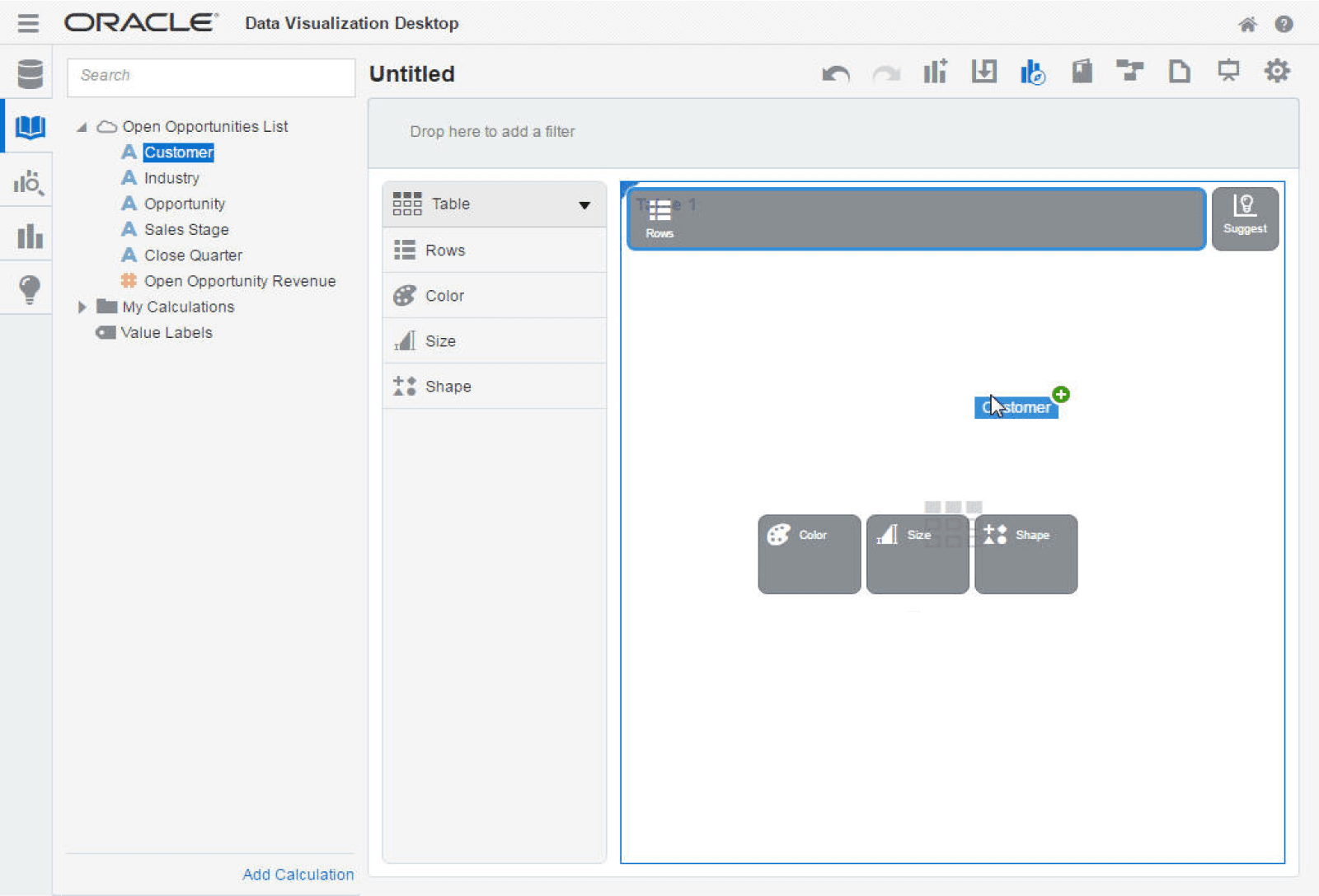
New Report Creation with Target Drop Zone Highlighted
To support that model, the interface had to be responsive and supportive. Rather than surfacing invalid combinations as post-execution errors, the system constrained assembly in real time — guiding users into valid paths from the first action. As users explored data fields, they could see what sources were available and how they related. When blending additional data sources — including user-added sets — those combinations appeared alongside governed data in the same pane, enabling intuitive drag-and-drop exploration.
Users worked with governed entities — named, trusted objects already defined by the data model — without writing joins or navigating metadata syntax directly. They could bring in new data, combine it visually with existing sources, and immediately see the impact — a step beyond classic BI, where combining disparate sources typically required IT support or separate preparation.
Governance and access controls remained active throughout; the system respected who could see which data and how it was defined, but those rules were woven into the experience rather than surfaced as separate administrative tasks.
Structure was no longer something users worked around. It became something they could shape and explore — with the system preserving trust while enabling momentum.
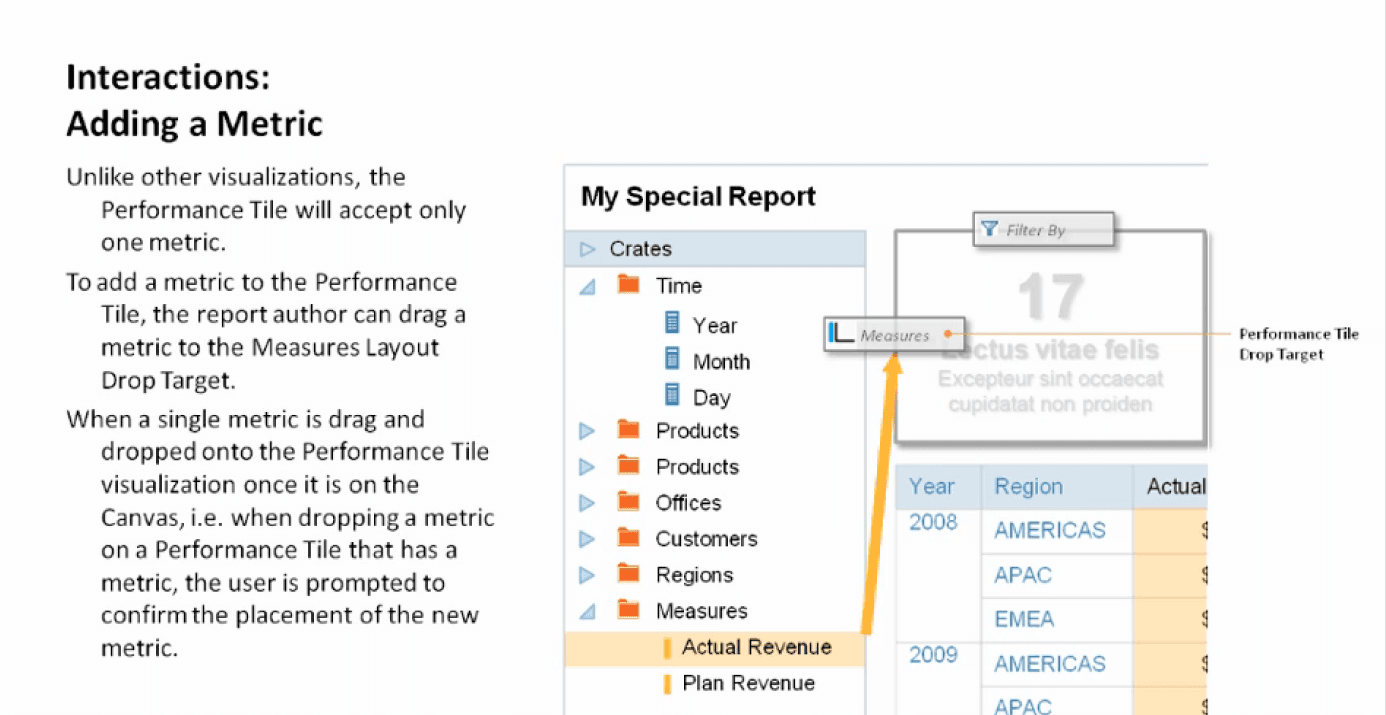
Metric placement logic guiding how measures can be added or replaced within a visualization
Translating Known Behavior into a New Tool
Our earlier research made it clear that users did not turn to spreadsheets because they didn’t trust the numbers. They turned to them because spreadsheets let them move fast.
In a spreadsheet, a user could drag columns, insert a calculation, adjust a grouping, and see the results instantly. There was no waiting on IT or backend modeling work. That immediacy let them iterate on a question the moment it arose.
The intent in designing Visual Analyzer was not to copy spreadsheets. Spreadsheets and BI serve different purposes. Spreadsheets are flexible, but they lack shared definitions and enterprise controls. What we needed was a way to bring rapid iteration into a governed environment.
Modern self-service analytics tools — including Oracle’s analytics platform — are explicitly designed to let users explore data visually and interactively without relying on technical intermediaries. They support drag-and-drop, prompt quick visual feedback, and empower users to create their own insights while the system handles the underlying data integration and definitions.
In Visual Analyzer, that translation meant:
• Users could add fields and rearrange them to change groupings without navigating through complex menus or submitting requests to IT.
• Adding measures recalculated aggregates immediately, putting response time closer to the pace of thought.
• Filters and visual changes reshaped results without breaking the user’s context or forcing them out of the authoring experience.
• Users could blend enterprise sources with additional data they brought into the system, supporting exploration across governed and local datasets.
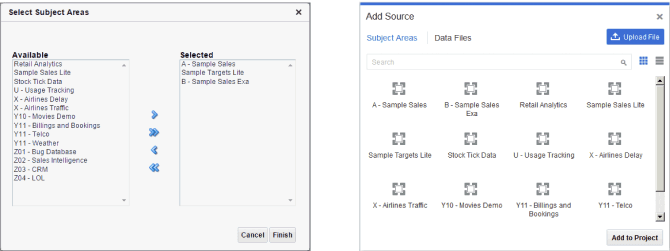
New Report Creation Data Source Selection
Rather than exposing raw database constructs or requiring manual joins, the interface let users work with curated, governed entities — the building blocks that had already been defined and trusted.
This distinction mattered. It meant that exploration could happen inside the governed system instead of outside it — preserving consistency while enabling the rapid iteration that users had previously sought in spreadsheets.
Core Interaction Principles
As the interaction model took shape, the design settled around a small set of guiding principles grounded in how real people worked with data.
We did not choose these principles because they were fashionable. We chose them because they solved the problems users were running into when they left the governed system to experiment externally.
The interaction model settled around four principles, each derived from where users had been failing in the existing system.
First: prevent dead ends before they form. Rather than letting users build invalid combinations and surface errors after execution, the system constrained what could be assembled in the first place. Errors caught late break momentum; errors prevented never register.
Second: keep configuration in context. Traditional tools buried detailed settings in modal dialogs or separate screens. In Visual Analyzer, adjustments to structure, filters, and groupings happened directly in the authoring surface. No context jump between planning and seeing.
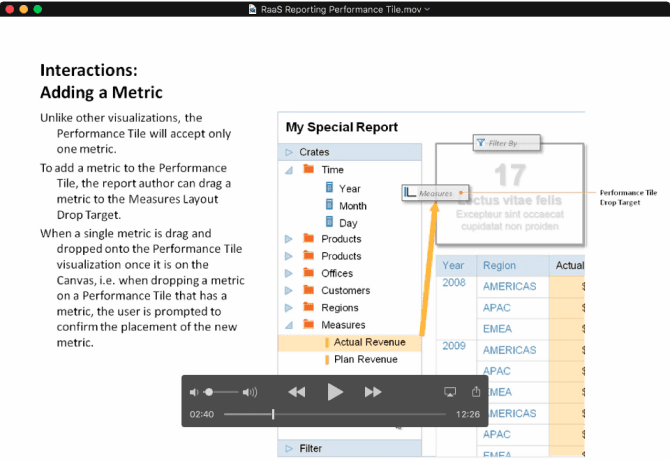
Metric placement logic guiding how measures can be added or replaced within a visualization
Third: make feedback immediate. Analytics are iterative. If each structural change required a wait, the tool would slow the pace of thinking rather than match it. Visual Analyzer responded to structural changes instantly.
Finally, governance had to be persistent — not optional. Users worked interactively, but inside shared definitions and access rules that governed what data they could see and how it could be combined. The goal was not to remove governance. It was to make it invisible when it worked and protective when it mattered.
Users could work interactively, but they did so inside the boundaries of shared definitions and access rules that governed what data they could see and how it could be used. The goal was not to eliminate governance. It was to make it part of the interaction — invisible when it worked and protective when it mattered.
Together, these design principles balanced the core tension at the heart of the project: users needed flexibility to explore, and the enterprise needed consistency to trust.
What Made Visual Analyzer Different from Traditional BI
Visual Analyzer changed not just what users could do, but how they engaged with data.
Traditional BI placed most of the work upstream. Data models, relationships, and reports were defined and controlled by IT teams. Business users could interact with dashboards and run queries, but their ability to reshape structure or combine new sources was limited and often required technical support. This made traditional BI strong at consistency and control, but slower and less flexible for real-time exploration.
Visual Analyzer shifted that dynamic.
Instead of treating modeling as something that happened upstream and reporting as something that happened downstream, Visual Analyzer brought structure into the authoring experience itself. Users could interact with data directly — adding fields, creating groupings, refining filters, and blending data sources — without needing to navigate back to a separate modeling layer. This placed exploration closer to the pace of business questions, reducing dependency on technical teams and shortening the cycle from insight to answer.
In practice, this meant:
• Users could interpret and reshape data within the same interface where they visualized results.
• Analysis became more self-service, with drag-and-drop and visual exploration replacing strictly predefined reports.
• Combining governed enterprise data with additional sources became more natural and immediate, without bypassing controls.
This shift distinguished Visual Analyzer within Oracle’s analytics portfolio: it preserved the consistency and trust of enterprise BI while giving business users more control to ask and answer their own questions, faster and with less reliance on IT.
Productization Into Oracle Data Visualization
What began as a new interaction model for exploratory analysis did not remain an isolated concept. The principles and patterns defined for Visual Analyzer became foundational to Oracle Data Visualization, a key component of Oracle’s broader analytics platform.
Oracle Data Visualization was designed to help users explore data more interactively and intuitively than traditional BI tools. Users could upload their own data files, connect to governed subject areas, or blend multiple sources together and begin visual exploration quickly, all from a single interface.
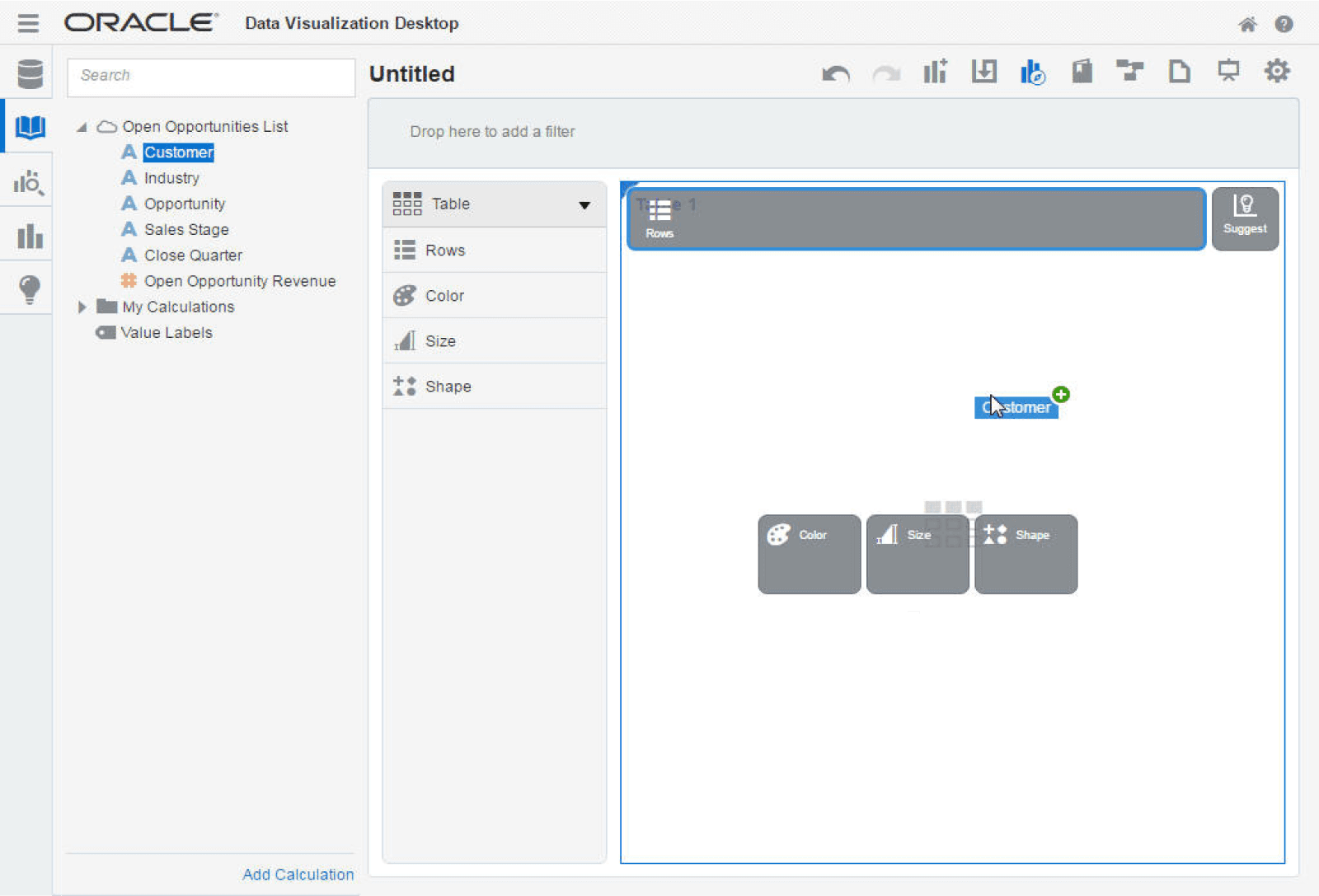
New Report Creation with Target Drop Zone Highlighted
Rather than limiting analysis to predefined reports, Data Visualization provided a drag-and-drop experience that let users build visual representations of their data, discover patterns, and construct visual narratives with minimal technical overhead. This self-service capability was a departure from the more IT-centric workflows that had dominated earlier BI solutions.
As engineering implemented the interaction model, behaviors were refined to work at scale across a range of datasets and use cases. Governance did not disappear; it was preserved at the data source and metadata level, ensuring consistent definitions and access control even as users engaged with data more flexibly.
The move from prototype to product demonstrated that exploration and governance could coexist. Visual Analyzer’s concepts influenced how Oracle positioned self-service analytics: users could explore their own questions and iterate rapidly, while the enterprise retained control and trust in the underlying data definitions.
Outcome
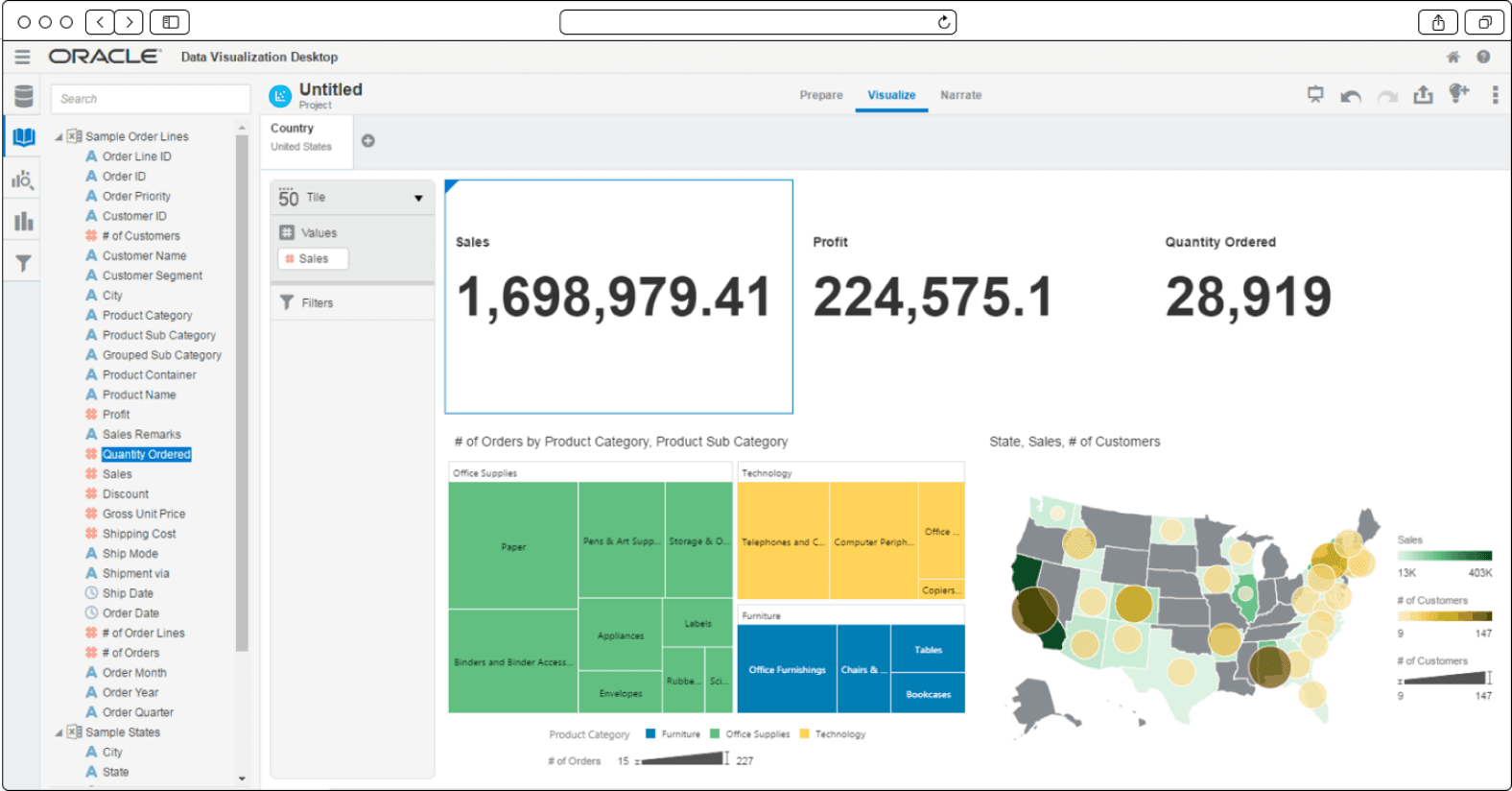
Composed dashboard built through direct manipulation of governed enterprise data
The immediate outcome of Visual Analyzer was not simply a new way to draw charts. It was a shift in what users could do and how they could do it.
Before Visual Analyzer, many exploratory questions pushed users outside the governed system. When a new idea arose — a combination of data sources, a different grouping, or a bespoke calculation — the only practical way to pursue it was to export data into a spreadsheet or external tool. Inside the governed environment, definitions were trusted but inflexible; outside them, users gained flexibility but lost shared consistency.
Visual Analyzer changed that balance.
Users could manipulate their data directly in the authoring experience — blending governed subject areas with additional datasets, adjusting measures and groupings on the fly, and seeing results update immediately. This brought rapid iteration into the governed environment and reduced reliance on external tools for discovery.
The system upheld consistent definitions and access controls, so users did not have to sacrifice trust for flexibility. Governance and self-service coexisted: business users explored, and the enterprise retained control over certified metrics and access policies.
Visual Analyzer helped extend Oracle’s analytics platform from a traditional reporting system into an environment that supported exploratory reasoning at business speed. Users could ask new questions, combine data sources, and build insights more rapidly and with greater ownership than before — all within the governed system.